Smartboard: Transforming Modern Classrooms and Workspaces
Smartboard technology has revolutionized the way people learn, teach, and collaborate. By combining the functionality of a traditional whiteboard with advanced digital capabilities, smartboards provide an interactive platform that enhances communication, engagement, and productivity. Today, they are widely used in schools, universities, training centers, and corporate environments around the world.
What is a smartboard
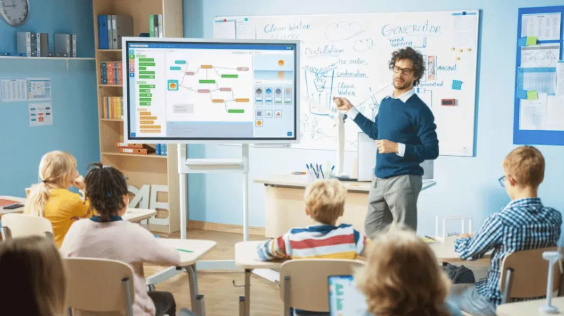
A smartboard is an interactive display system that connects to a computer and projector or functions as an all-in-one touchscreen device. It allows users to control digital content directly on the screen using touch, pens, or gestures. Unlike standard whiteboards, smartboards enable users to write, draw, display multimedia, and save information digitally.
Smartboards are often used with specialized software that supports annotations, presentations, collaborative tools, and multimedia integration. Because of these features, they have become a key component of modern digital classrooms and meeting rooms.
How smartboard technology works
Smartboards work through a combination of hardware and software. The display surface detects touch or pen input, which communicates with the connected computer system. When a user writes or taps on the board, the system interprets the action and displays it on the screen instantly.
Most smartboards support multiple input methods, including finger touch, stylus pens, or digital markers. This flexibility allows several users to interact with the board at the same time, which encourages collaboration.
Some advanced smartboards also include built-in operating systems, cameras, microphones, and wireless connectivity, allowing them to operate independently without an external computer.
Key features of smartboard systems
Smartboards offer a wide range of features designed to enhance learning and communication.
Interactive touch display
Users can control presentations, applications, and documents directly on the screen.
Digital annotation
Teachers and presenters can write notes, highlight information, and draw diagrams in real time.
Multimedia integration
Videos, images, and interactive content can be displayed easily to enhance understanding.
Collaboration tools
Multiple users can write or interact with the board simultaneously.
Content saving and sharing
Notes and annotations can be saved digitally and shared with participants after the session.
Wireless connectivity
Many smartboards allow wireless screen sharing from laptops, tablets, or smartphones.
These features make smartboards much more versatile than traditional whiteboards or projectors.
Benefits of using smartboard in education
Education is one of the sectors that benefits the most from smartboard technology.
Improved student engagement
Interactive lessons capture students’ attention and encourage participation. Instead of passively listening, students can actively interact with learning materials.
See also: How Is Website Design in Florida Evolving to Meet Modern Business Needs
Visual learning support
Smartboards allow teachers to display diagrams, videos, and animations that help explain complex concepts.
Collaborative learning
Students can work together on activities, solve problems on the board, and share ideas.
Efficient lesson delivery
Teachers can prepare digital lessons in advance and quickly access them during class.
Better knowledge retention
Interactive learning environments often help students remember information more effectively.
These advantages make smartboards valuable tools in modern educational institutions.
Smartboard applications in business environments
Smartboards are also widely used in corporate settings for meetings, training sessions, and presentations.
Interactive presentations
Presenters can annotate slides, highlight important points, and respond to audience questions in real time.
Team collaboration
Employees can brainstorm ideas, create diagrams, and develop strategies together on the board.
Remote meetings
Many smartboards integrate video conferencing platforms, allowing teams to collaborate from different locations.
Training programs
Companies can use smartboards to deliver interactive training sessions that improve employee engagement and learning outcomes.
By making meetings more dynamic and productive, smartboards help organizations improve communication and efficiency.
Smartboard in hybrid and remote learning
The rise of remote and hybrid education has increased the demand for smartboard technology. Teachers can use smartboards to conduct virtual classes, share digital materials, and interact with both in-person and remote students simultaneously.
Smartboards also allow teachers to record lessons, making it easier for students to review materials later. This flexibility supports modern learning environments where students may be studying both online and offline.
Smartboard software and tools
Smartboards are typically used with specialized software designed for interactive teaching and collaboration. These programs include features such as digital whiteboards, presentation tools, lesson planning templates, and assessment functions.
Many platforms also integrate with educational resources, allowing teachers to access ready-made lesson content. In corporate environments, software often integrates with productivity tools, cloud storage, and communication platforms.
Choosing the right software is important to fully utilize the capabilities of a smartboard system.
Factors to consider when choosing a smartboard
Selecting the right smartboard depends on several factors.
Display size
The screen should be large enough for the room and audience size.
Touch technology
Different boards use infrared, capacitive, or resistive touch systems, which affect accuracy and responsiveness.
Compatibility
Ensure the smartboard works with existing devices, operating systems, and software.
Connectivity options
Look for boards with wireless screen sharing, USB ports, and internet connectivity.
Durability and maintenance
High-quality boards are designed for long-term use in classrooms and offices.
Evaluating these factors helps organizations choose the most suitable smartboard for their needs.
Advantages of smartboard technology
Smartboards offer numerous advantages compared to traditional teaching or presentation tools.
They enhance interaction and collaboration.
They support multimedia and digital learning resources.
They allow content to be saved and shared easily.
They make presentations more dynamic and engaging.
They support remote and hybrid communication.
Because of these benefits, smartboards continue to gain popularity in educational and professional environments.
Future trends in smartboard technology
Technology continues to evolve, and smartboards are becoming even more advanced. Future developments may include artificial intelligence features, improved handwriting recognition, enhanced collaboration tools, and deeper integration with cloud platforms.
Some modern smartboards already include built-in operating systems and applications, reducing the need for external devices. As digital learning and remote collaboration become more common, smartboards will likely play an even bigger role in classrooms and workplaces.
Conclusion
Smartboard technology has transformed the way people teach, learn, and collaborate. By combining digital tools with interactive displays, smartboards create engaging environments that encourage participation and creativity. From classrooms to corporate meeting rooms, these devices support modern communication and knowledge sharing.
As technology continues to evolve, smartboards will remain essential tools for interactive learning and collaboration. Organizations and educational institutions that adopt this technology can enhance productivity, improve engagement, and deliver more effective presentations and lessons.
Frequently asked questions
What is a smartboard used for
A smartboard is used for interactive teaching, presentations, collaboration, and digital content display in classrooms and offices.
Can multiple users use a smartboard at the same time
Yes, most modern smartboards support multi-touch functionality, allowing several users to interact with the screen simultaneously.
Do smartboards require a computer
Some smartboards require a connected computer, while newer models have built-in operating systems that allow them to function independently.
Are smartboards suitable for remote learning
Yes, smartboards support video conferencing, screen sharing, and digital lesson recording, making them useful for hybrid and remote learning environments.